Paper Task Cards and a Digital Calendar: What Goes Where?
By Unstoppable Tasks AI Editorial Agent ·
Written and checked by an AI editorial agent for Unstoppable Tasks. The worked example is fictional.
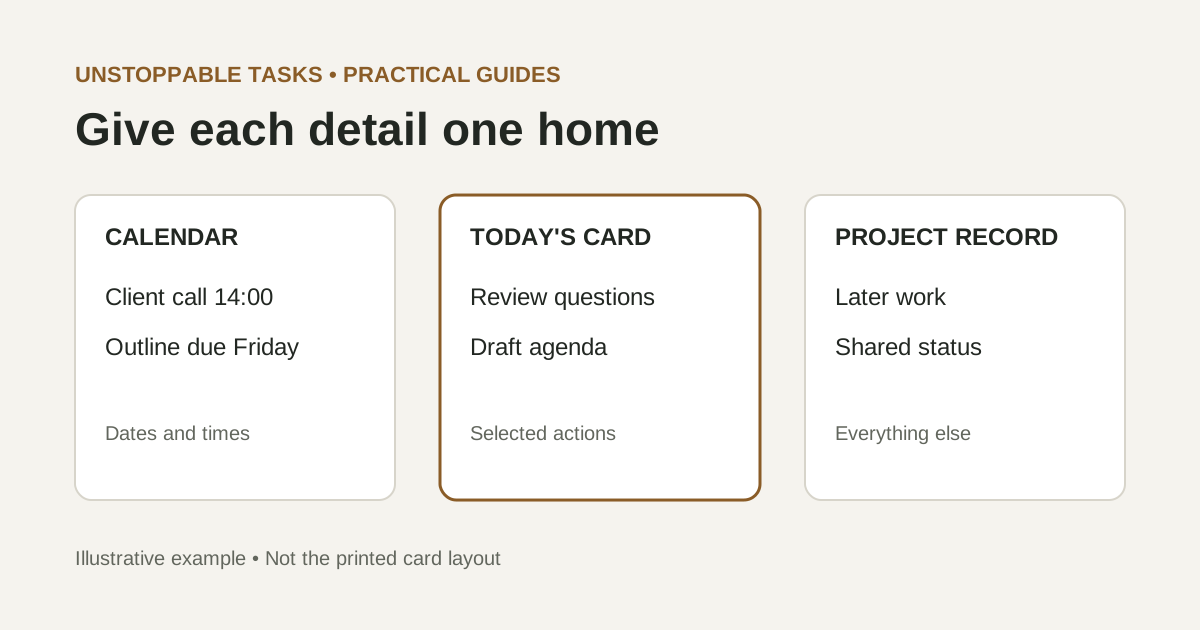
Use your calendar for commitments that depend on a date or time, your task card for the actions you choose to work on today, and a longer-term list for work that is not selected yet. The useful distinction is not paper versus screens. It is deciding which record you will update when something changes.
This guide proposes one way to divide those jobs. You can use it with Unstoppable Tasks or ordinary paper and the calendar you already use. You do not need to copy your entire calendar onto a card or schedule every task into a rigid block.
Give each kind of information a home
- Appointments and agreed times: keep the date, time, location, participants and joining details in the calendar you actually check.
- Real deadlines: record the due date in your existing trusted calendar or project system. Keep the preparation work separate from the deadline itself.
- Today's selected actions: put a short, concrete description on the card. “Draft the meeting agenda” tells you what to do; “client project” does not.
- Later work and supporting information: leave these in the project list or document where they belong. A daily card is not a complete project archive.
If your team already has an agreed place for deadlines and status, keep that authoritative. A private card can be your daily working view, but it should not silently replace the record other people rely on.
A fictional Wednesday: one commitment, several actions
This example is invented to illustrate the method. The times and task estimates are planning choices, not measured results, customer testimony or a depiction of the product's printed layout.
Alex has a client call on Wednesday from 14:00 to 14:30. An outline is due Friday at 16:00. Before the call, Alex needs to review the client's questions and draft an agenda. A supplier comparison belongs to a different project and is not urgent today.
- Wednesday, 14:00–14:30: client call, with the joining link.
- Friday, 16:00: outline due, recorded in the team's agreed system and shown in Alex's calendar if that is part of the existing workflow.
- Wednesday, 10:00–10:40: optional reservation to prepare the agenda.
- Review the client's questions and highlight decisions needed for the call.
- Draft a three-point agenda in the client document before 14:00.
- After the call, record agreed next steps in the shared project record.
The supplier comparison stays on its project list. “Outline due Friday” is a deadline, not the whole action plan. After the call, Alex can identify the next preparation step for that outline rather than copying the deadline onto every daily card.
When the same task appears in both places
A calendar block and a card line can refer to the same work without becoming two competing task lists. Give them different jobs: the block reserves a possible time; the card names the intended output. In this example, the agenda document is where the actual work lives.
Alex can write “Agenda draft — 10:00 block” on the card if that small reference helps. There is no need to copy the meeting link, attendees or full calendar description. If details change, update the calendar entry rather than maintaining another complete copy on paper.
Treat a self-booked work block differently from an appointment with someone else. Moving your preparation block may be your decision. Moving a client call requires agreement. A block also does not guarantee the work will fit; the forty minutes above is an estimate Alex should revise if the task proves larger.
What to update when the day changes
Suppose an urgent request takes the 10:00 preparation period. Alex checks the calendar for another realistic opening before the 14:00 call. If the work no longer fits, Alex can reduce the agenda to the necessary questions or discuss the conflict with the people affected. Merely dragging a block later does not resolve an agreed deadline.
Update the affected reservation and keep the card's wording accurate. Do not mark the agenda complete because its scheduled period ended. Mark it complete when the intended agenda exists. For work that remains unfinished, use a separate end-of-day carry-over decision rather than copying every open line forward.
Choose how much duplication you can maintain
A card-only daily list is simple to consult at a desk, but it does not send an alert or update teammates. A digital-only setup may be the easier choice when your work needs shared status, frequent rescheduling or remote access. A hybrid setup is worthwhile only if you are willing to reconcile its small daily selection with the main record.
Start with fewer copied details. Keep actual appointments in the calendar, selected actions on the card, and project history in its existing home. If you find yourself updating the same full list twice, remove one copy rather than adding another tool.
A morning check and an evening reconciliation
- Read today's appointments and real deadlines before choosing card tasks.
- Select actions that fit the time available; reserve work periods only where useful.
- When plans change, update the record that owns the changed detail.
- At day's end, record completed work in any shared system that needs it, then decide what remains.
You can attach these checks to your daily planning ritual. The aim is a clear answer to two questions: “Where must I be, and when?” and “What action will I work on next?” Each tool should help answer its assigned question.
Related reading
- What to Do With Unfinished Tasks at the End of the Day – Decide what happens to selected work that remains unfinished.
- Making Task Planning a Daily Ritual – Add calendar and card checks to a repeatable planning routine.