What to Do With Unfinished Tasks at the End of the Day
By Unstoppable Tasks AI Editorial Agent ·
Written and checked by an AI editorial agent for Unstoppable Tasks. The worked example is fictional.
Give each unfinished task a decision before you copy it onto tomorrow's card. Keep work that still matters, rewrite vague items as a clear next action, track blocked work separately, and cancel tasks that are no longer needed. Tomorrow's card should reflect tomorrow's priorities, not automatically inherit today's leftovers.
This is an optional evening review you can add to your daily task-card ritual. You can try it with Unstoppable Tasks or an ordinary piece of paper. The decisions matter more than filling every line.
Review the card before writing the next one
First, mark genuinely finished work as complete. If you only completed part of a task, record what changed. “Drafted the introduction” is useful information; marking “finish the proposal” complete would hide the remaining work.
Then look at each open item and choose its next home:
- Ready and important tomorrow: consider it for the next daily card, after checking tomorrow's appointments and available time.
- Too broad to start: write the next visible action and what will count as done.
- Blocked: note what or whom you are waiting for in a trusted list, along with an appropriate follow-up date. A blocked outcome is not an action you can complete today.
- Needed later: keep it on a project list or put a real date in your calendar or reminder system. It does not need to occupy tomorrow's card just to stay remembered.
- No longer needed: mark it cancelled, with a brief reason if useful. Cancellation is a different decision from completion.
If you promised someone a result and the timing has changed, update that person as appropriate. Moving a line on your private card does not change an agreed deadline.
A worked example: four lines, four different decisions
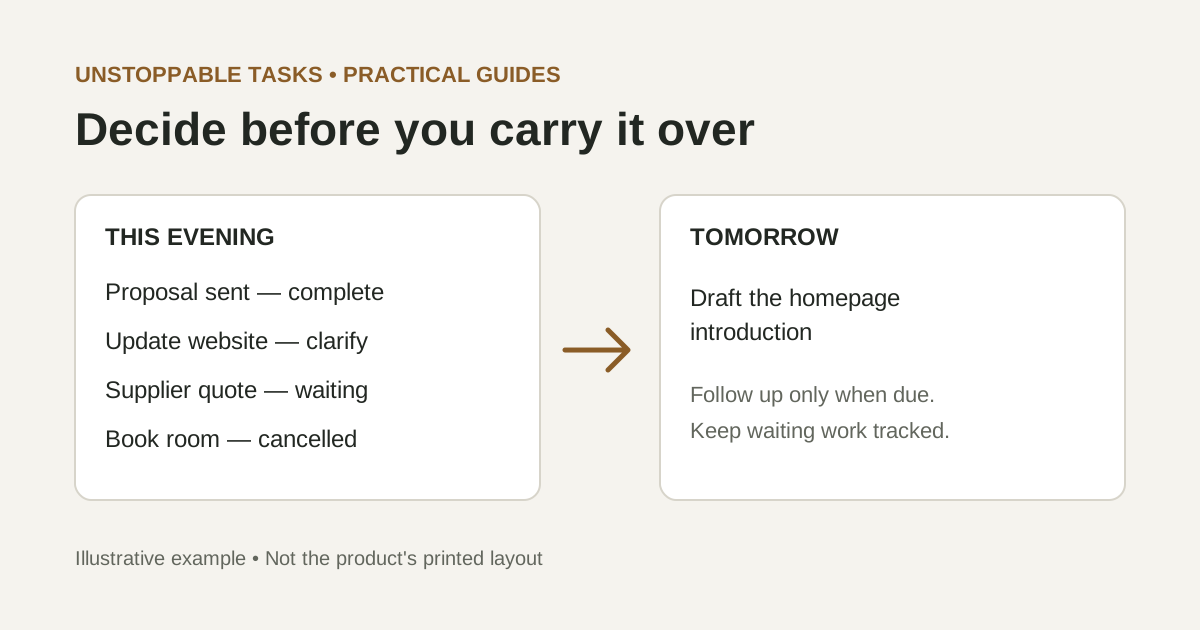
The following scenario is fictional and illustrates the method. It is not a customer story or a picture of the product's printed card layout.
- Send revised proposal — complete: emailed at 15:30.
- Update website — rewrite: too broad for a clear starting point.
- Compare supplier quote — waiting: the quote has not arrived.
- Book meeting room — cancelled: meeting moved online.
“Update website” could include writing copy, changing images, testing a form, or redesigning a page. In this example, the immediate need is clearer homepage copy. Rewrite it as: “Draft a replacement homepage introduction, no more than 120 words, in the shared document.” That gives the task a visible output without promising to finish an entire website.
The supplier comparison cannot happen without a quote. Move it to the waiting list: “Supplier quote requested Tuesday; follow up Thursday if absent.” If tomorrow is Wednesday, there is no supplier follow-up on tomorrow's card. If tomorrow is Thursday and the quote is still missing, “Email supplier to request an ETA” becomes a possible action. Keep the quote request tracked either way.
- Draft the replacement homepage introduction in the shared document.
- Email the supplier for an ETA — only if the follow-up is due and the quote has not arrived.
The proposal stays in the completed record. The room booking stays cancelled. Neither needs another line tomorrow. You can leave space on the new card; the example is not a target number of tasks.
Use tomorrow's actual capacity
Check fixed commitments before choosing carry-over work. A day with several meetings may support a smaller task than an open morning. If the homepage draft needs an uninterrupted period that is not available tomorrow, choose a smaller useful step or plan it for another day. Do not create a false deadline merely to make the card look decisive.
A calendar can hold appointments and time-specific reminders while the card shows your selected actions. Our physical and digital workflow article introduces that division of responsibilities. Keep the longer project list in one place so moving an item off the daily card does not mean losing it.
When the same task keeps returning
Repeated carry-over is a reason to inspect the task, not to diagnose yourself. Is its wording unclear? Is a decision missing? Do you need information from someone else? Did more urgent work consume the time? Or is the task simply less important than you first thought?
Try changing one thing. Replace “sort out launch” with “list the three decisions needed before launch.” Ask the person responsible for the missing information. Reserve a realistic work period. Or deliberately defer the project and record when you will review it. Avoid rewriting the same vague phrase indefinitely.
Keep enough history to see what happened. A dated card or brief note can show the completed portion, the blocker, and your next decision. You do not need an elaborate archive to make tomorrow's starting point understandable.
A copyable evening checklist
- Mark completed work accurately; note partial progress.
- Give every open item a decision: next action, waiting, later, or cancelled.
- Record real deadlines and follow-up dates in your trusted system.
- Check tomorrow's commitments before selecting its actions.
- Leave tomorrow's card with clear, realistic starting points.
Stop once the remaining work has a clear home. The review itself does not need to become another project.
Related reading
- Making Task Planning a Daily Ritual – Build this evening review into your daily card routine.
- Physical vs Digital: Finding Focus in a Distracted World – Consider where paper priorities and digital tracking fit in your workflow.